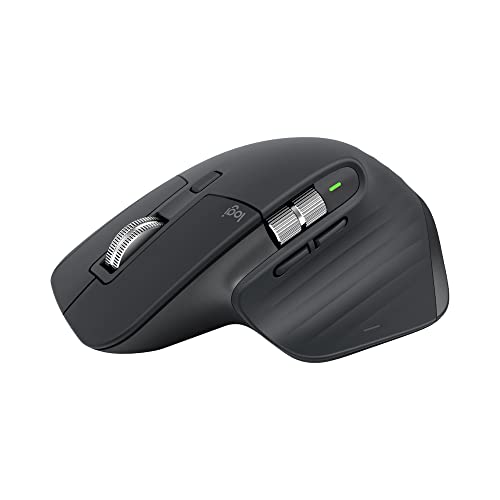
The Hook & Overview: Desk Hardware Built for Heavy Workloads
In an industry saturated with disposable plastic peripherals, Logitech's MX Master series has achieved near-cult status among software engineers, creative directors, and remote workstation professionals. For knowledge workers who spend forty to sixty hours a week navigating complex interfaces, a mouse is not merely an input accessory; it is an ergonomic extension of the hand where cumulative micro-latencies dictate physical fatigue and daily productivity. The Logitech MX Master 3S refines an already dominant chassis architecture rather than reinventing it for the sake of novelty. Retaining the deeply sculpted, hand-filling right-handed palm rest and precision thumb flare that defined its predecessor, the 3S directly addresses the two most common user requests: audible noise fatigue and sensor flexibility on modern display arrays. The result is a masterclass in functional industrial design that treats desk comfort, mechanical tactile feedback, and workflow continuity across operating systems as indispensable baseline standards.
Ergonomic Architecture
Deep palm cradle and thumb rest reduce wrist pronation angle, eliminating forearm fatigue during marathon 8+ hour coding and editing sprints.
Dual Hardware Wheels
Top MagSpeed wheel free-spins vertically through 1,000 lines/sec while the lateral aluminum wheel flies across wide timelines and sheets.
Quick Glance Specifications Matrix
| Specification Category | Logitech MX Master 3S Technical Details |
|---|---|
| Model / Part Number | Logitech MX Master 3S (910-006556 Graphite / 910-006557 Pale Gray / 910-006558 Black) |
| Amazon ASIN | B09HM94VDS |
| Sensor Technology | Darkfield High Precision Optical Sensor (Glass tracking minimum 4mm thickness) |
| DPI Range | 200 to 8,000 DPI (Adjustable in 50 DPI increments via Logi Options+) |
| Primary Switches | Quiet Click acoustic dampened switches (90% decibel reduction vs. MX Master 3) |
| Primary Scroll Wheel | MagSpeed Electromagnetic SmartShift Wheel (Tactile ratchet + free-spin up to 1,000 lines/sec) |
| Secondary Wheel | Dedicated machined aluminum thumb horizontal scroll wheel |
| Total Buttons | 7 buttons (Left/Right Click, Back/Forward, App-Switch, Wheel Mode Shift, Middle Click, Gesture Button) |
| Wireless Connectivity | Dual-mode: Logi Bolt USB-A Receiver (2.4 GHz encrypted) + Bluetooth Low Energy (BLE 5.1) |
| Multi-Host Switching | Easy-Switch button (underside) toggling up to 3 paired computers |
| Cross-Platform Sync | Logitech Flow (Simultaneous cursor transit & clipboard file/text transfer across Mac & Windows) |
| Polling Rate | 125 Hz (Logi Bolt Receiver) / 90 Hz – 125 Hz (Bluetooth LE) |
| Battery & Charging | Rechargeable 500 mAh Li-Po; up to 70 days per full charge; USB-C fast charging (1 min = 3 hrs) |
| Dimensions & Weight | 124.9 mm x 84.3 mm x 51.0 mm (4.92 x 3.32 x 2.01 in); 141 g (4.97 oz) |
| OS Compatibility | Windows 10/11, macOS 10.15+, iPadOS 14+, ChromeOS, Linux (basic input), Android 9.0+ |
Acoustic Dampening & 8K DPI Optical Precision: Silent Control Anywhere
The defining engineering triumphs of the 3S reveal themselves the second you click a button or set the mouse down on an uncooperative surface. Logitech replaced standard mechanical clickers with proprietary Quiet Click acoustic switches, achieving a measured 90% sound reduction compared to the previous MX Master 3. Rather than an intrusive, sharp metallic snap that cuts through quiet home offices or echoes across open-plan workspaces and microphone feeds, actuation produces a hushed, muted thump that preserves crisp tactile resistance without acoustic intrusion. Paired with that silent actuation is an upgraded 8,000 DPI Darkfield optical sensor—doubling the 4,000 DPI ceiling of earlier generations. Configurable in granular 50 DPI increments through the Logi Options+ suite, this sensor tracks flawlessly on high-gloss transparent glass conference tables, polished stone desks, and hotel countertops without requiring a mousepad. When traversing expansive multi-monitor arrays, ultra-wide workstation panels, or 4K and 5K retina displays, the expanded DPI allows sweeping edge-to-edge pointer travel with conservative wrist deflection, substantially reducing repetitive strain throughout long work sessions.
During high-density voice calls and late-night focus sessions, standard microswitch clicks easily trigger cardioid desk microphones. The Quiet Click switches on the 3S absorb high-frequency transients completely, ensuring completely silent input during conference calls, podcast recordings, and quiet home offices.
MagSpeed Electromagnetic Wheel & Ergonomic Thumb Hub: Effortless Navigation
At the heart of the top deck sits the machined steel MagSpeed Electromagnetic scroll wheel, an engineering marvel that utilizes controlled electromagnetic coils rather than mechanical gears. In default SmartShift mode, the wheel tracks the speed of your finger: scroll gently and it delivers positive, satisfying click-by-click ratchet resistance; flick the wheel with momentum and the magnetic polarity disengages instantly, sending the wheel into an ultra-quiet, frictionless free-spin capable of ripping through 1,000 lines of code, dense financial ledgers, or 200-page PDF documents per second. Anchoring the lateral side is a dedicated ergonomic thumb cradle built for horizontal dexterity. Housing a smooth, machined aluminum horizontal thumb wheel alongside tactile forward and back navigation buttons, it accelerates horizontal timeline scrubbing in video suites like Premiere Pro, DaVinci Resolve, and Final Cut, as well as navigation across expansive multi-column financial sheets. Hidden directly beneath the thumb rest is an integrated gesture button that triggers customized window management, desktop switching, or application launches with a simple downward press and directional swipe.
Logitech MX Master 3S Wireless Mouse
Save $20 today on Amazon with Prime delivery. 8K DPI glass tracking, MagSpeed wheel, and whisper-quiet switches.
Multi-OS Pairing & Logitech Flow: Seamless Cross-Platform Mastery
Modern desk setups rarely rely on a single machine, and the MX Master 3S serves as the ultimate multi-device control center. Equipped with both an encrypted Logi Bolt USB-A receiver and low-latency Bluetooth Low Energy (BLE 5.1), the mouse pairs with up to three independent hosts—such as a corporate Windows desktop, a personal MacBook Pro, and an iPad Pro—toggled on demand via a recessed underside Easy-Switch button. However, the standout operational advantage for hybrid workflows is Logitech Flow. Operating over your local Wi-Fi network through Logi Options+, Flow allows you to glide the mouse cursor off the edge of a Windows screen and onto an adjacent macOS display without pressing a single physical toggle. Even more impressively, Flow maintains a unified cross-platform clipboard: you can copy a block of code, a high-resolution graphic asset, or a batch of files on your Mac workstation and paste them directly into a Windows directory in real time. Whether you work with multi-laptop desk arrangements or bridge a workstation to a secondary setup like a portable external display, Flow eliminates cloud-drive workarounds, flash drives, and manual KVM switches entirely.
By syncing cursor location and operating system clipboards across local Wi-Fi, Logitech Flow allows drag-and-drop file transfers between Apple macOS and Microsoft Windows systems effortlessly—removing the need for secondary flash drives, AirDrop workarounds, or cloud uploads.
Honest Trade-offs & Limitations: What You Must Know Before Buying
Despite its peerless productivity credentials, our real-world workflow assessment reveals specific physical and technical compromises that prospective buyers must weigh. First and foremost is physical footprint and mass: weighing a hefty 141 grams (4.97 oz) with a hardware-locked 125Hz polling rate (an 8ms reporting delay), the MX Master 3S is ill-suited for fast-paced gaming. On high-refresh 144Hz to 240Hz monitors, fast cursor sweeps in competitive first-person shooters or twitch esports feel noticeably stepped and sluggish compared to sub-60g esports mice operating at 1,000Hz or 4,000Hz polling rates. Second, the ergonomic shell is uncompromisingly right-handed; the severe lateral contouring, thumb shelf, and secondary control cluster make the chassis completely unusable for left-handed operators, with Logitech offering no ambidextrous or left-handed counterpart. Finally, prospective owners should consider exterior surface wear. The soft-touch polyurethane coating covering the palm rest and thumb cradle provides exceptional tactile grip out of the box, but heavy daily friction, natural skin oils, and perspiration can gradually wear down the matte finish over two to three years of sustained use, leaving smooth or slightly discolored wear marks.
If your daily routine includes fast-twitch competitive shooters (CS2, Valorant, Apex Legends), the 141g weight and 125Hz polling rate will feel sluggish. For gaming-first setups, a dedicated lightweight mouse is recommended alongside the 3S. Additionally, left-handed users must opt for symmetrical alternatives.
Two-Column Pros & Cons Assessment
What We Love (Pros)
-
Ultra-quiet acoustic switches: Deliver 90% noise reduction with distinct, crisp tactile actuation feedback.
-
8,000 DPI Darkfield sensor: Tracks flawlessly on clear glass (>= 4mm) and multi-screen 4K/5K workstation setups.
-
MagSpeed electromagnetic wheel: Shifts dynamically from ratchet precision to 1,000 lines/second free-spin navigation.
-
Logitech Flow cross-OS bridging: Enables direct drag-and-drop and clipboard copying between macOS and Windows hosts.
-
Dedicated aluminum thumb wheel: Accelerates video timeline scrubbing and spreadsheet navigation horizontally.
-
Superb 70-day USB-C battery life: Includes emergency 1-minute quick charging delivering 3 hours of continuous uptime.
What Needs Work (Cons)
-
125Hz polling rate & 141g mass: Make the mouse unsuited for fast-paced competitive esports or twitch shooters.
-
Strictly right-handed ergonomic shell: Completely leaves left-handed workstation users with zero ergonomic options.
-
Soft-touch rubberized coating: Can exhibit subtle oily shine and cosmetic wear after several years of friction.
-
No internal storage bay: Missing chassis cavity to store the included Logi Bolt USB receiver during mobile travel.
-
Logi Options+ software overhead: Consumes modest background memory and CPU resources on low-spec hardware.
-
Incompatible with legacy Unifying receivers: Requires the newer Logi Bolt wireless protocol for RF connections.
How It Compares: Premium Productivity Mouse Showdown
| Feature / Metric |
Logitech MX Master 3S
Editor's Choice
|
Keychron M6 Wireless | Razer Pro Click Humanscale |
|---|---|---|---|
| MSRP / Deal Price | $99.99 / $79.99 | $49.00 – $69.00 | $99.99 |
| Chassis Weight | 141 g (Sculpted Ergonomic) | 78 g (Ultra-lightweight) | 106 g (Medium Contour) |
| Sensor DPI & Tech | 8,000 DPI (Darkfield Optical) | 26,000 DPI (PixArt PAW3395) | 16,000 DPI (Razer 5G Optical) |
| Glass Tracking Support | Yes (>= 4mm glass) | No (Pad Required) | Inconsistent |
| Polling Rate | 125 Hz (Office Focused) | 1,000 Hz (1ms response) | 1,000 Hz (1ms response) |
| Dual Wheel System | MagSpeed + Thumb Wheel | Top Infinite + Thumb | Single Tilt Wheel Only |
| Click Sound Profile | Near-Silent (90% Dampened) | Moderate Mechanical Snap | Moderate Tactile Click |
| Cross-OS Clipboard | Logitech Flow (Mac & PC) | None (Hardware Switch) | None (Hardware Switch) |
| Target Workflow | Power productivity, editing, multi-PC | Hybrid office & casual high-refresh gaming | Pure ergonomic palm-grip workstations |
| Direct Link | Check Amazon Deal | Check Amazon | Check Amazon |
When weighed against its closest rivals, the MX Master 3S continues to hold the productivity crown. The Keychron M6 Wireless mounts an aggressive challenge for hybrid users who crave dual scroll wheels and want a featherweight 78g chassis with a 1,000Hz polling rate for casual gaming, but Keychron lacks glass-tracking capability, near-silent click acoustics, and the seamless clipboard-sharing intelligence of Logitech Flow. The Razer Pro Click, developed alongside posture specialist Humanscale, offers a comfortable high-arch ergonomic grip and superior gaming-grade polling rates, yet omits a secondary horizontal thumb wheel and struggles on non-standard desk surfaces. For pure workstation efficiency, Logitech's integrated hardware and software ecosystem remains unmatched.
The Purchasing Verdict & Value: The Definitive Desk Investment
Evaluating a premium workstation tool comes down to one metric: does it measurably reduce daily friction and physical fatigue over years of sustained use? The Logitech MX Master 3S answers with an emphatic yes. By solving click distraction in quiet work environments, eliminating mousepads on transparent surfaces, and providing an electromagnetic scroll engine that saves minutes of tedious finger scrolling every single day, the 3S cements its position as essential desk equipment. While its standard $99.99 MSRP is already justified by its build quality and software longevity, Amazon regularly discounts the flagship Graphite edition down to $79.99—a 20% price drop that puts $20 back in your wallet (pricing and stock availability are subject to change on Amazon). If you spend your working life inside IDEs, design canvases, video timelines, or financial models, the Logitech MX Master 3S is the single best productivity hardware upgrade you can make under $100, earning our definitive Editor's Choice Award.
Verified ASIN: B09HM94VDS • Free Shipping with Amazon Prime
Frequently Asked Questions (FAQ)
Is the Logitech MX Master 3S worth upgrading from the MX Master 3?
Yes, particularly if you work in sound-sensitive environments or utilize high-resolution multi-monitor setups. The MX Master 3S introduces two substantial hardware upgrades: Quiet Click switches that reduce acoustic click noise by 90% while retaining tactile actuation feedback, and an upgraded 8,000 DPI Darkfield optical sensor (doubling the 4,000 DPI limit of the older MX Master 3) that tracks smoothly across clear glass surfaces. Additionally, the 3S transitions to Logitech's newer, highly secure Logi Bolt wireless protocol rather than the legacy Unifying receiver.
Does the MX Master 3S work seamlessly between macOS and Windows?
Yes. Through the Logi Options+ software suite, Logitech Flow enables seamless cross-platform operation across up to three Mac and Windows computers simultaneously. When configured on the same local Wi-Fi network, moving your cursor past the physical boundary of a Mac monitor pushes control straight onto your Windows screen. Furthermore, Flow synchronizes a unified cross-OS clipboard, allowing you to copy text, high-resolution graphics, and full project files directly between different operating systems without flash drives or cloud storage.
How long does the MX Master 3S battery last on a single charge?
The internal 500 mAh rechargeable lithium-polymer battery delivers up to 70 days of continuous operation on a full charge under typical office conditions (and approximately 45 to 60 days under heavy, multi-device commercial use). Charging is handled via a front-facing USB-C port that allows unrestricted mouse operation while plugged in. If caught with a depleted battery before an important meeting, an integrated quick-charge protocol provides up to 3 hours of continuous work from a single 60-second top-up.
Is the Logitech MX Master 3S good for gaming as well as productivity?
The MX Master 3S handles casual gaming, real-time strategy titles, and slower simulation games with ease, but it is not engineered for competitive first-person shooters or twitch esports. Its 141-gram ergonomic mass is roughly double that of dedicated ultralight gaming mice, and its polling rate is hardware-locked to 125Hz (yielding an 8-millisecond report interval). On modern 144Hz or 240Hz high-refresh gaming displays, fast flick shots can feel stepped or latency-constrained compared to dedicated gaming hardware operating at 1,000Hz or higher.